 Skip to content


Accidentally deleted an important text message? Before assuming it’s gone for good, check your iPhone’s Recently Deleted folder.
If the message was deleted within roughly the past 30 days, there’s a good chance you can recover it without downloading an app or restoring your entire phone.
Here’s what to try, starting with the easiest method.
How to Recover Deleted Messages on iPhone
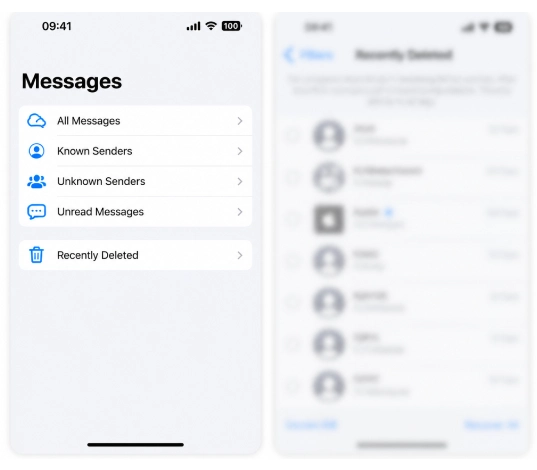
On iPhones running iOS 16 or later, the Messages app has a Recently Deleted folder.
Follow these steps:
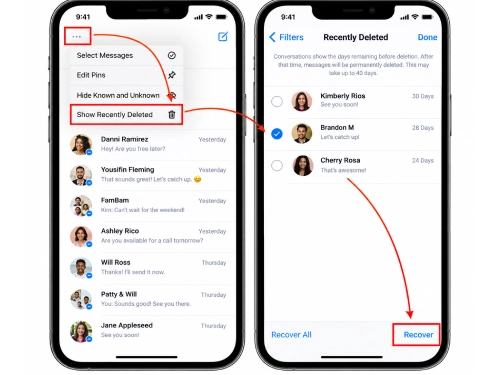
- Open the Messages app.
- From the conversation list, tap Filters. On iOS 18, tap Edit instead.
- Select Recently Deleted.
- Find and select the conversation containing the deleted message.
- Tap Recover.
- Confirm by tapping Recover Message or Recover Messages.
Open the conversation again. Your recovered messages should be back.
A small but important detail: If you deleted just one message from a conversation, you may still need to select that conversation in Recently Deleted to recover it.
How Long Do Deleted Messages Stay on iPhone?
Apple allows deleted messages to be recovered for approximately 30 days. Its support guidance also mentions a recovery period of 30–40 days in some cases.
After that period, the messages are automatically removed from Recently Deleted.
If the message is important, check the folder as soon as possible rather than waiting.
Can’t Find Recently Deleted?
If you don’t see the Recently Deleted option, check these possibilities.
Your iPhone is running an older iOS version.
The Recently Deleted feature was introduced with iOS 16. Check your version under Settings > General > About.
You’re looking in the wrong menu.
On newer iOS versions, tap Filters from the conversation list. On iOS 18, use Edit.
The message is no longer available for recovery.
If the message was deleted too long ago or was permanently removed from Recently Deleted, it will no longer appear there.
Updating your iPhone won’t bring back a message that was already permanently deleted.
What If the Message Is Missing, Not Deleted?
Sometimes a conversation is hard to find because it has moved down your message list or is being filtered.
Before trying to recover it, search for it:
- Open Messages.
- Tap the search field in the conversation list.
- Enter the contact’s name, phone number, or a word you remember from the message.
- Check the results.
On newer iOS versions, the search field is near the bottom of the conversation list.
You can also tap Filters and check Unknown Senders if the message came from an unfamiliar number.
If the message appears in search, you don’t need to recover it. It was still on your phone.
Can You Recover Deleted iPhone Messages From iCloud?
Possibly, but it depends on how your iPhone was backed up.
There are two situations worth understanding.
If Messages in iCloud Is Turned On
Your messages sync across devices using your Apple Account.
If you delete a message, that deletion can also sync to your other devices. Those synced messages aren’t included in your regular iCloud device backup.
In this case, Recently Deleted is the first place to check. Restoring an older device backup usually won’t recover messages that were stored through Messages in iCloud.
If Messages in iCloud Is Turned Off
Your text messages may be included in an iCloud device backup.
If you have a backup from before the message was deleted, restoring that backup may recover it.
Be careful before trying this. Restoring an iCloud backup onto an already configured iPhone requires erasing the device first. You could lose newer information that isn’t saved elsewhere.
Don’t reset your iPhone just to test whether an old backup contains one missing message.
If you want to investigate this option, first read Apple’s instructions for restoring an iPhone from a backup and confirm you have a suitable backup.
Can You Recover Permanently Deleted Messages on iPhone?
If a message is no longer in Recently Deleted and you don’t have an earlier backup containing it, recovery may not be possible.
Be cautious with apps or websites promising to recover every deleted message. Some require payment or access to sensitive data without being able to guarantee a result.
If you only need the contents of a conversation, there’s another simple option: ask the other person to resend the message or share a screenshot.
Deleting a message from your iPhone doesn’t normally remove the recipient’s copy.
Questions People Often Ask
Yes, if they’re still in Recently Deleted. You don’t need an iCloud backup to use that feature.
Yes. Recently Deleted can recover messages removed from a conversation, although you select the conversation containing them during recovery.
No. Using Recently Deleted doesn’t erase your existing conversations. Restoring an older device backup is different and may replace newer data.
Not through Recently Deleted. An older backup may help in some circumstances, but recovery isn’t guaranteed.
Check Recently Deleted Before Trying Anything Else
If you’ve just deleted a text, start with Messages > Filters > Recently Deleted. It’s the quickest method and doesn’t require another app.
If the message isn’t there, search your conversations to make sure it isn’t simply hidden. Only consider restoring an older backup after checking what it contains and understanding the risk to your current data.
And if the message can’t be recovered, asking the sender for another copy may save you time and frustration.